PasteShelfSaved replies for Windows
Save your regular replies.Paste them with a shortcut.
Keep customer replies, directions, and links ready to paste in compatible Windows apps, including text that mixes Arabic and English.
Windows 11, Intel or AMD x64. App interface: English.
Planned price: US$9 once. Lifetime updates included.
Preparing for release. Purchases are not open yet.
See it in action
Read the transcript
Typing the same text again?
Save it once as a pin. An address, directions, or any reply you reuse. Give it a shortcut. Save it. You're ready the next time you need it.
Click into a text field and press your shortcut. Your saved text appears, ready to review. You choose when to send.
Keep different replies on different shortcuts. A description, a useful link, or details people ask for. Pick the answer you need.
Some answers are worth keeping. Turn on optional history to keep text you've copied. Save the useful reply as a pin. Pause history whenever you like.
Close PasteShelf and open it again. Your saved text and shortcuts are still here.
Your saved text can include Arabic too. The link, emoji, and line break stay intact.
PasteShelf comes in one ZIP, with the app, install tools, and an offline guide.
The planned price is nine US dollars, paid once, with lifetime PasteShelf updates and a thirty-day money-back guarantee.
The real Windows app, version 0.1.1. This is an example reply, not customer data. Open the full-size screenshot.
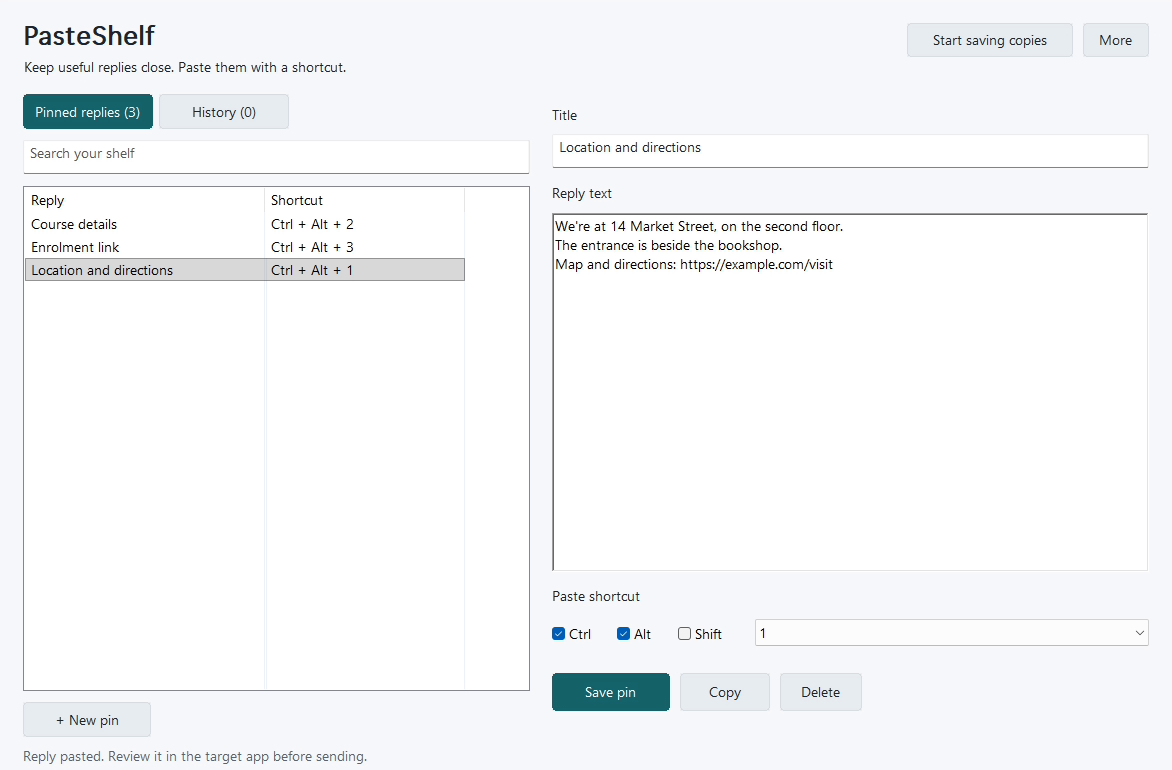
Write it once. Keep it on your shelf.
Save a reply
Write a greeting, an order update, or a snippet you use often. Give it a title so you can find it again.
Choose its shortcut
Assign your own key combination. Your pinned replies and shortcuts stay saved when you close and reopen the app.
Paste where you are working
Click the text field and press the shortcut. Review the text before sending; PasteShelf never presses Send for you.
Two replies you could keep ready
Illustrative saved text. You write the reply and choose its shortcut.
Thanks for getting in touch. Please send your order number so I can check the status for you.
أهلًا بك! نقطة اللقاء أمام Blue Palm Café.
الموعد الساعة 9:00 صباحًا. سننتظرك عند المدخل.
A place for the text you reuse
- 50 pinned replies
- Keep your regular text separately from recent copies. Search by title or text when a shortcut is not enough.
- 100 recent text copies
- Turn on clipboard history when you need it. It starts paused, and you can pause it again or clear it while keeping your pins.
- Arabic and English together
- Save multiline replies with Arabic, English words, order IDs, links, diacritics, and emoji. The app interface is in English.
- Your shelf stays on your computer
- Pins and history are stored locally with Windows account encryption. Clipboard text is never uploaded by PasteShelf.
When a shortcut for each reply helps
Useful when you reuse a small set of replies across compatible Windows apps and want each reply on a keyboard shortcut.
- Windows clipboard history
-
What it already provides: Recent items and pins, with optional sync.
When to consider PasteShelf: You want named replies and a keyboard shortcut for each reply.
- WhatsApp Business quick replies
-
What it already provides: Saved replies within WhatsApp.
When to consider PasteShelf: You also use the same text in other compatible Windows apps.
- Notes or a document
-
What it already provides: A simple place to keep standard text.
When to consider PasteShelf: Finding and copying from the document is repeatedly inconvenient.
If your existing replies or clipboard tool already works well, you may not need another app.
What your purchase includes
Planned price: US$9 USD · one-time payment
Preparing for release. Purchases are not open yet.
Any applicable tax and the final total will be shown at checkout.
A downloadable ZIP with the Windows app, installer, uninstaller, local HTML guide, license, privacy information, and release notes. Install it for your own Windows account without administrator access.
When sales open, the app will be delivered through your Lemon Squeezy purchase download. Future PasteShelf releases will be added to the same purchase.
One purchase. Lifetime PasteShelf updates.
One person, on the Windows computers they use. Personal and commercial work included. Every future PasteShelf version is included, with no renewal fee.
30-day money-back guarantee
If PasteShelf does not suit you, request a full refund within 30 calendar days of purchase. You do not need to give a reason. Read the refund policy.
License and app privacyTell me which apps you use and what kind of replies you repeat. Please leave out private customer details.
Before you buy
These are my own compatibility tests. They do not guarantee that every app or text field will work.
- System
- Windows 11 on an Intel or AMD x64 computer. Windows ARM64 and macOS are not supported. No separate runtime or driver is needed.
- Text fields
- Plain-text paste has been tested in native Windows fields and Chrome inputs, text areas, and editable content. Some apps intercept shortcuts or block simulated paste. Administrator windows and Windows security screens are not supported.
- Messaging apps
- Mixed Arabic and English paste was tested in the actual WhatsApp Desktop message editor on Windows 11. The test draft was removed without sending. Facebook’s message editor has not yet been tested.
- Installation
- The current app is unsigned, so Windows may show an unknown-publisher warning. The guide explains installation and removal.
Backups and removing your data
There is no cloud sync. Before resetting Windows, export your pins and keep the file outside that Windows installation. Import it afterwards to restore pins and shortcuts. Exports contain unencrypted text and shortcuts, without history. Uninstalling keeps your local shelf; the guide explains how to remove it. License and app privacy.
Made and supported by me
My dad wanted a way to keep his regular customer-service replies close and give each one an easy shortcut. I built PasteShelf around that request.
I’m Karim Mesallam, a software developer based in Dahab, Egypt. For product questions or a refund, email karim.mesallam@gmail.com. Please include your order number for purchase questions. For app problems, include the version and a short example without private customer details.